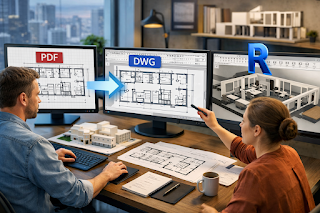
So here’s the real-world question architects are asking today:
How do we move from static PDFs to intelligent Revit models without restarting projects from scratch?
The answer increasingly lies in PDF to DWG conversion, which acts as a practical bridge between old documentation and modern BIM workflows. When combined with PDF to Revit conversion services, architects can dramatically accelerate Revit adoption, reduce rework, and protect years of design intelligence.
This article explores how and why architects use PDF to DWG conversion to fast-track Revit adoption along with trends, challenges, and opportunities shaping the CAD design and drafting industry in the USA and UK.
Why Is Revit Adoption Still a Challenge for Many Architecture Firms?
Despite widespread BIM mandates and client demand, Revit adoption isn’t always smooth.
According to Autodesk industry research, over 60% of architecture firms still rely on legacy CAD and PDF documentation for ongoing renovations, tenant improvements, and retrofit projects. This creates friction when firms try to standardize on Revit.
Common challenges include:
- Thousands of archived PDF drawings with no editable CAD files
- Inconsistent drawing scales and undocumented revisions
- Tight project timelines that don’t allow full redraws
- Limited in-house resources trained in Revit modeling
For many firms, starting Revit models from scratch is simply not feasible especially for renovation-heavy markets like the USA and UK.
This is where the workflow of convert PDF to DWG Revit becomes critical.
What Is PDF to DWG Conversion and Why Do Architects Use It?
PDF to DWG conversion is the process of transforming non-editable PDF drawings into structured, layered AutoCAD (DWG) files. These DWGs then serve as a clean base for Revit modeling.
Architects use this workflow because:
- DWG files import smoothly into Revit
- Geometry can be snapped, traced, and referenced accurately
- Layers help organize walls, doors, dimensions, and annotations
- Scale and alignment issues can be resolved before Revit modeling
In short, PDF to CAD Conversion Services allow architects to recover usable design data instead of redrawing everything manually.
How Does PDF to DWG Conversion Accelerate Revit Adoption?
1. It Eliminates the “Blank Screen” Problem in Revit
One of the biggest mental and technical barriers to Revit adoption is starting with an empty model.
By converting PDFs to DWG first, architects can:
- Import clean CAD backgrounds into Revit
- Trace walls, grids, and levels with confidence
- Establish project coordinates quickly
This makes Revit feel less intimidating, especially for teams transitioning from AutoCAD.
2. It Reduces Modeling Time by Up to 50%
Industry estimates from AEC productivity studies show that tracing directly from scanned PDFs can take 30–50% longer than working from structured DWG files.
When architects use PDF to Revit conversion services, they benefit from:
- Proper line weights and vector geometry
- Clean alignment across multiple sheets
- Faster creation of walls, floors, and families
The result? Faster BIM setup and quicker project kickoffs.
3. It Improves Accuracy for Renovation and Retrofit Projects
In the USA and UK, a large percentage of architectural work involves:
- Adaptive reuse
- Historic renovations
- Commercial interior fit-outs
These projects often rely on old PDFs or scanned drawings. Converting them into DWG ensures:
- Accurate scaling across all plans
- Better coordination with structural and MEP teams
- Reduced site discrepancies
This accuracy is essential before developing an as-built Revit model.
What Is the Typical Workflow Architects Follow?
Architects rarely jump directly from PDF to Revit. Instead, they follow a proven multi-step process.
Step-by-Step Workflow:
- PDF Assessment
- Identify vector vs scanned PDFs
- Check scale, clarity, and sheet consistency
- PDF to DWG Conversion
- Clean linework
- Layer separation (walls, doors, text, dimensions)
- Removal of redundant elements
- DWG Optimization
- Scale verification
- Alignment across sheets
- Xref setup if needed
- DWG Import into Revit
- Use as underlays
- Trace with Revit-native elements
This workflow is the backbone of many professional CAD Conversion Services supporting Revit adoption globally.
Why Not Convert PDFs Directly to Revit?
This is a common voice-search question:
“Can’t architects convert PDF directly to Revit?”
Technically, yes but practically, it comes with limitations.
Direct PDF-to-Revit tools often struggle with:
- Layer recognition
- Line continuity
- Text and dimension accuracy
- Complex architectural symbols
That’s why many firms still prefer a PDF → DWG → Revit approach. DWG acts as a translation layer that ensures clean data before BIM modeling.
How Are AI and Automation Changing PDF to CAD Conversion?
One of the biggest trends in the CAD design and drafting industry is the rise of AI-assisted conversion tools.
According to McKinsey’s AI in construction analysis, automation can improve drafting productivity by up to 30% when combined with human quality control.
Modern Pdf to CAD Conversion Services now use:
- AI-based vector recognition
- Automated layer classification
- Smart text detection
However, human expertise remains essential especially for architectural accuracy and Revit readiness.
What Are the Biggest Challenges in PDF to DWG Conversion?
Despite technological advances, challenges still exist.
Key Pain Points Architects Face:
- Poor-quality scanned PDFs
- Missing dimensions or unclear annotations
- Inconsistent drawing standards across decades
- Manual cleanup after automated conversion
This is why experienced CAD Conversion Services are often preferred over fully automated tools.
Why Is This Especially Relevant in the USA and UK?
The USA and UK architectural markets share some unique characteristics:
- Strong renovation and retrofit demand
- Strict building codes and documentation standards
- Growing BIM mandates for public-sector projects
According to UK BIM Framework data, BIM adoption continues to rise, but legacy documentation remains a bottleneck.
PDF to DWG conversion helps firms comply with BIM requirements without abandoning historical project data.
How Does This Impact Collaboration Across Disciplines?
Once architects establish clean DWG-based Revit models, collaboration improves dramatically.
Benefits include:
- Better coordination with MEP and structural engineers
- Reduced RFIs during construction
- Cleaner model handoffs to contractors
This collaborative advantage is a major driver behind the growing demand for PDF to Revit conversion services worldwide.
What Should Firms Look for in PDF to CAD Conversion Services?
When choosing a partner, architects should prioritize:
- Architectural drawing expertise
- Revit-ready CAD standards
- Quality assurance processes
- Experience with USA and UK codes
The goal isn’t just conversion, it’s future-proof BIM adoption.
Final Thoughts:
Revit adoption doesn’t have to mean abandoning decades of design work.
By strategically using convert PDF to DWG Revit workflows, architects can:
- Accelerate BIM implementation
- Reduce modeling time
- Improve project accuracy
- Maximize the value of existing documentation
As CAD and BIM technologies continue to evolve, PDF to CAD Conversion Services will remain a critical bridge between the past and the future of architectural practice.
In the conclusion of many successful BIM transitions, firms often partner with a leading UK CAD design company experienced in architectural drafting, Revit modeling, and complex conversions ensuring both speed and accuracy without disrupting ongoing projects.
In a world moving rapidly toward digital construction, the smartest firms aren’t starting over, they’re converting forward.
Read also: BrokerEins.com Review: Step Into a Smarter Era of Global Trading